> ## Documentation Index
> Fetch the complete documentation index at: https://opentouter.ai/docs/llms.txt
> Use this file to discover all available pages before exploring further.
# Workspace Budgets
> Set spending limits per workspace with automatic enforcement
Workspace budgets let you cap how much a workspace can spend on OpenRouter inference. Set a dollar limit on any combination of intervals — daily, weekly, monthly, or lifetime — and OpenRouter blocks requests automatically once a limit is reached.
Workspace budgets are available on the **Enterprise** plan. Only **Organization Administrators** can create, edit, or delete budgets — other workspace members can view budgets and current spend but cannot modify them. Contact [sales](https://openrouter.ai/contact/sales) to get started.
## How It Works
Each workspace can have up to four budgets, one per interval:
| Interval | Resets | Use case |
| ------------ | ----------------------------------- | ------------------------------------------- |
| **daily** | Every day at midnight UTC | Prevent runaway spend from a single bad day |
| **weekly** | Every Monday at midnight UTC | Smooth out weekly burst usage |
| **monthly** | First of each month at midnight UTC | Enforce a fixed monthly allocation |
| **lifetime** | Never | Hard cap on total workspace spend |
When a request comes in, OpenRouter checks the workspace's current spend against every configured budget. If any budget is met or exceeded, the request returns a `403 Forbidden` error:
```
Workspace monthly budget of $500.00 exceeded. Contact your workspace admin.
```
The error names the broadest exceeded interval so users know which limit triggered the block.
### Ordering Rule
Budget limits must be **strictly decreasing** as the interval narrows:
```
lifetime > monthly > weekly > daily
```
For example, if your monthly budget is $1,000, the weekly budget must be less than $1,000 and the daily budget must be less than the weekly budget. You don't need to set all four intervals — only the ones you set must follow this ordering.
## Setting Budgets in the Dashboard
1. Go to your workspace's **Settings** page at `https://openrouter.ai/workspaces//settings`
2. Scroll to the **Budgets** section
3. Click **Add budget**, choose an interval, and enter a dollar amount
4. Repeat for additional intervals
5. Click **Save**
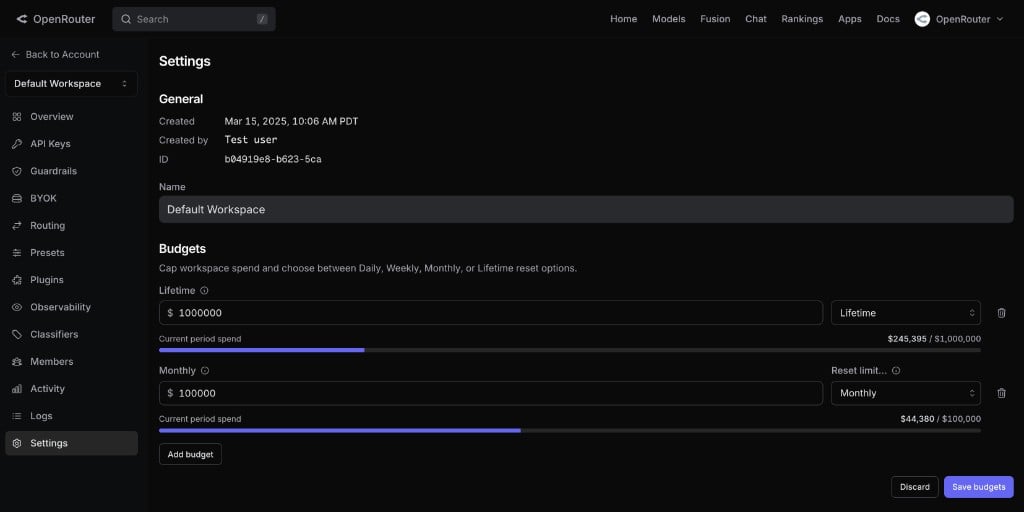 Each budget row shows a progress bar with current-period spend against the limit. If spend already exceeds a limit, the bar turns red and a warning appears.
These steps require the **Organization Administrator** role.
## Setting Budgets via the API
You can also manage budgets programmatically using a [management API key](/guides/overview/auth/management-api-keys). The endpoints live under `/api/v1/workspaces/{id}/budgets`.
### List Budgets
```bash lines theme={null}
curl https://openrouter.ai/api/v1/workspaces/{workspace_id}/budgets \
-H "Authorization: Bearer $MANAGEMENT_KEY"
```
```json lines theme={null}
{
"data": [
{
"id": "770e8400-e29b-41d4-a716-446655440000",
"workspace_id": "880e8400-e29b-41d4-a716-446655440000",
"limit_usd": 1000,
"reset_interval": "monthly",
"created_at": "2025-08-24T10:30:00Z",
"updated_at": "2025-08-24T15:45:00Z"
}
]
}
```
### Create or Update a Budget
Use `PUT` with the interval in the path. If a budget for that interval already exists, it's updated.
```bash lines theme={null}
curl -X PUT https://openrouter.ai/api/v1/workspaces/{workspace_id}/budgets/monthly \
-H "Authorization: Bearer $MANAGEMENT_KEY" \
-H "Content-Type: application/json" \
-d '{"limit_usd": 1000}'
```
Valid intervals: `daily`, `weekly`, `monthly`, `lifetime`.
The server validates the ordering rule — if the new limit would violate the strictly-decreasing constraint relative to existing budgets, the request returns `400 Bad Request` with a message like:
```
Budget limits must be strictly decreasing as scope narrows:
the monthly limit ($500) must be greater than the weekly limit ($600).
```
### Delete a Budget
```bash lines theme={null}
curl -X DELETE https://openrouter.ai/api/v1/workspaces/{workspace_id}/budgets/monthly \
-H "Authorization: Bearer $MANAGEMENT_KEY"
```
```json lines theme={null}
{
"deleted": true
}
```
Deleting a budget that doesn't exist returns success (idempotent).
## Spend Tracking
Budget enforcement uses OpenRouter's usage pipeline, which tracks spend per workspace across each interval window. The progress bar in the dashboard shows real-time spend relative to each configured limit.
When you create a workspace, spend starts at zero for every interval. Periodic budgets (daily, weekly, monthly) reset automatically at the start of each period. lifetime budgets accumulate indefinitely.
## Budgets During Workspace Creation
Enterprise org admins can also set budgets when creating a new workspace. The workspace creation form includes an optional **Budgets** section where you can configure limits before any keys are issued.
## FAQ
Budget checks run before the request is routed to a provider. In-flight requests that were already dispatched will complete, so actual spend may slightly exceed the budget limit. The next request after the overage is detected will be blocked.
Workspace budgets apply to OpenRouter-billed spend. BYOK requests that are routed with your own provider key and don't consume OpenRouter credits are not counted against workspace budgets.
Yes. Every workspace — including the Default workspace — can have budgets configured.
Users receive a `403 Forbidden` error on the blocked request with a message naming the exceeded budget. There are no proactive email or webhook notifications yet — budget status is visible in the workspace settings dashboard.
No. Only organization admins can modify budgets. Members whose requests are blocked should contact their org admin to raise the limit.
Each budget row shows a progress bar with current-period spend against the limit. If spend already exceeds a limit, the bar turns red and a warning appears.
These steps require the **Organization Administrator** role.
## Setting Budgets via the API
You can also manage budgets programmatically using a [management API key](/guides/overview/auth/management-api-keys). The endpoints live under `/api/v1/workspaces/{id}/budgets`.
### List Budgets
```bash lines theme={null}
curl https://openrouter.ai/api/v1/workspaces/{workspace_id}/budgets \
-H "Authorization: Bearer $MANAGEMENT_KEY"
```
```json lines theme={null}
{
"data": [
{
"id": "770e8400-e29b-41d4-a716-446655440000",
"workspace_id": "880e8400-e29b-41d4-a716-446655440000",
"limit_usd": 1000,
"reset_interval": "monthly",
"created_at": "2025-08-24T10:30:00Z",
"updated_at": "2025-08-24T15:45:00Z"
}
]
}
```
### Create or Update a Budget
Use `PUT` with the interval in the path. If a budget for that interval already exists, it's updated.
```bash lines theme={null}
curl -X PUT https://openrouter.ai/api/v1/workspaces/{workspace_id}/budgets/monthly \
-H "Authorization: Bearer $MANAGEMENT_KEY" \
-H "Content-Type: application/json" \
-d '{"limit_usd": 1000}'
```
Valid intervals: `daily`, `weekly`, `monthly`, `lifetime`.
The server validates the ordering rule — if the new limit would violate the strictly-decreasing constraint relative to existing budgets, the request returns `400 Bad Request` with a message like:
```
Budget limits must be strictly decreasing as scope narrows:
the monthly limit ($500) must be greater than the weekly limit ($600).
```
### Delete a Budget
```bash lines theme={null}
curl -X DELETE https://openrouter.ai/api/v1/workspaces/{workspace_id}/budgets/monthly \
-H "Authorization: Bearer $MANAGEMENT_KEY"
```
```json lines theme={null}
{
"deleted": true
}
```
Deleting a budget that doesn't exist returns success (idempotent).
## Spend Tracking
Budget enforcement uses OpenRouter's usage pipeline, which tracks spend per workspace across each interval window. The progress bar in the dashboard shows real-time spend relative to each configured limit.
When you create a workspace, spend starts at zero for every interval. Periodic budgets (daily, weekly, monthly) reset automatically at the start of each period. lifetime budgets accumulate indefinitely.
## Budgets During Workspace Creation
Enterprise org admins can also set budgets when creating a new workspace. The workspace creation form includes an optional **Budgets** section where you can configure limits before any keys are issued.
## FAQ
Budget checks run before the request is routed to a provider. In-flight requests that were already dispatched will complete, so actual spend may slightly exceed the budget limit. The next request after the overage is detected will be blocked.
Workspace budgets apply to OpenRouter-billed spend. BYOK requests that are routed with your own provider key and don't consume OpenRouter credits are not counted against workspace budgets.
Yes. Every workspace — including the Default workspace — can have budgets configured.
Users receive a `403 Forbidden` error on the blocked request with a message naming the exceeded budget. There are no proactive email or webhook notifications yet — budget status is visible in the workspace settings dashboard.
No. Only organization admins can modify budgets. Members whose requests are blocked should contact their org admin to raise the limit.